How to Deploy a Project with Private Git Submodules to AWS Amplify

The AWS Amplify version of the How to Deploy a Project to Vercel with Private Git Submodules that I wrote earlier. The process is almost the same.
1. Create a Fine-grained Personal Access Token
Go to the following page: https://github.com/settings/tokens?type=beta
Click on "Generate new token".
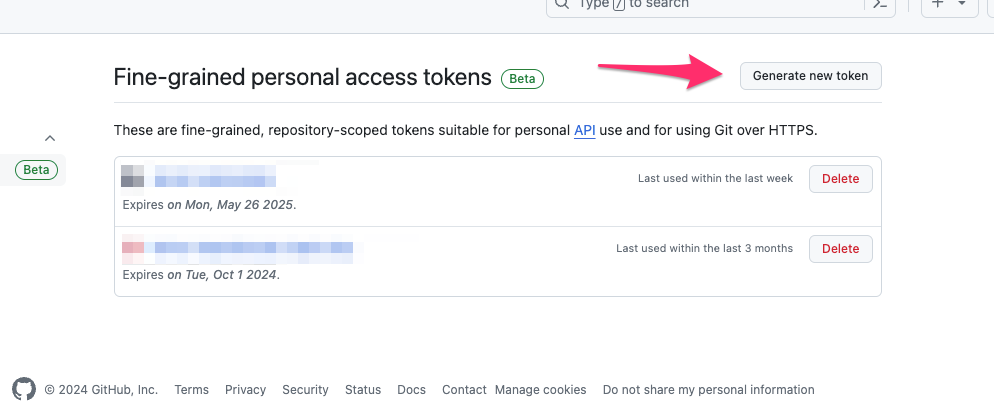
For Repository access, select "Only select repositories" and choose the minimum necessary repositories.
For Repository permissions, grant Read-only access to Contents only.
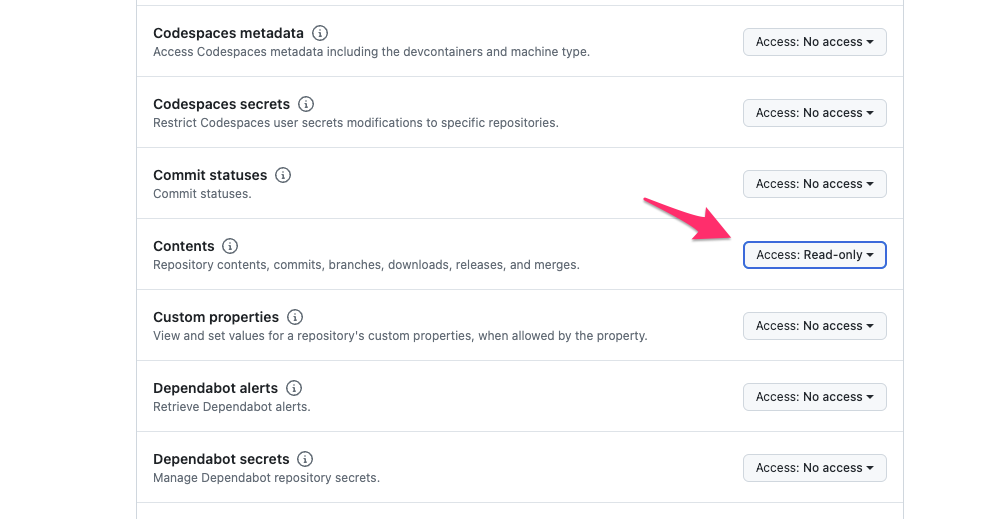
Click the "Generate token" button to create the token.
2. Register the Token as an Environment Variable in Amplify
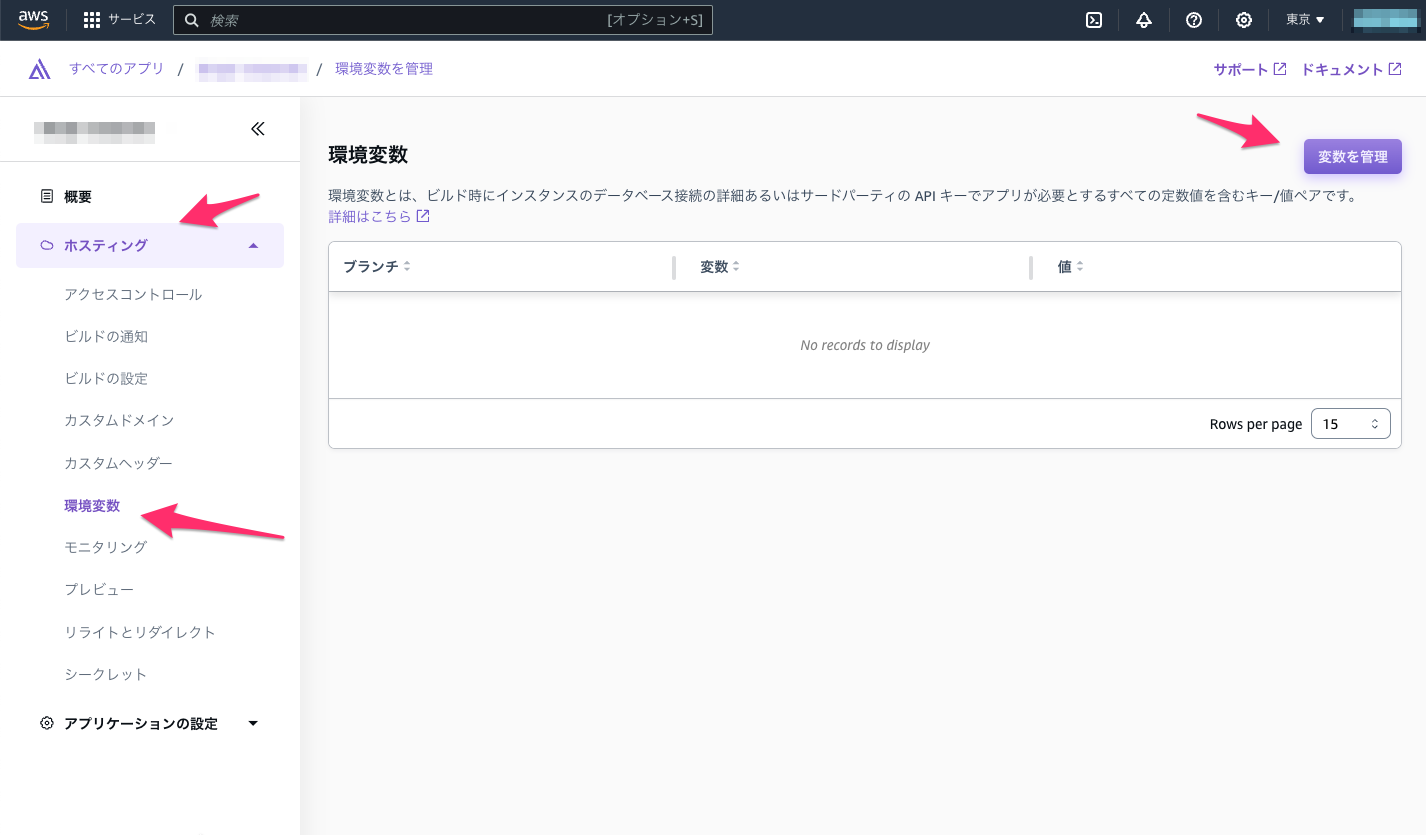
From the left menu, go to "Hosting" and select "Environment variables", then click on "Manage variables".
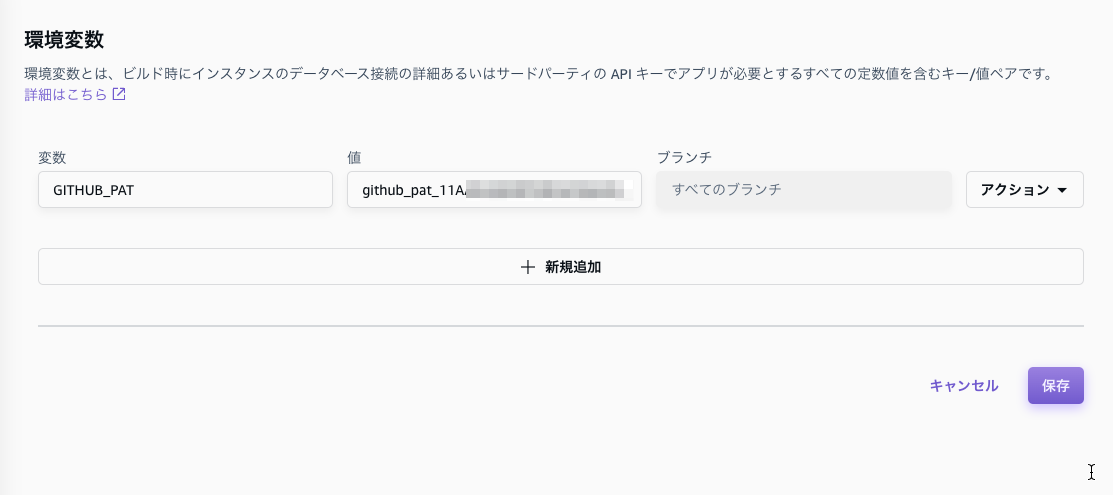
Add a new variable named GITHUB_PAT and set the token value.
3. Create a Build Script
Create a script named sh/pre-build-for-amplify.sh.
Recommended: Using GIT_ASKPASS
Embedding tokens directly in URLs poses a security risk, so using GIT_ASKPASS is the recommended approach.
GIT_ASKPASS is an environment variable that specifies a script to be automatically executed when git needs authentication credentials. It is safe because the token is not stored in the URL or git config.
#!/usr/bin/env bash

cd $(dirname $0)/../ || exit

set -e

if [ -z "${GITHUB_PAT}" ]; then
  echo "The environment variable GITHUB_PAT is not set. Please regenerate the GitHub Fine-grained token and register it as the GITHUB_PAT environment variable in Amplify."
  echo "https://github.com/settings/tokens?type=beta"
  echo "https://ap-northeast-1.console.aws.amazon.com/amplify/apps/"
  exit 1
fi

# Pass token via GIT_ASKPASS (no token in URLs)
ASKPASS_SCRIPT="$(mktemp)"
trap 'rm -f "${ASKPASS_SCRIPT}"' EXIT
cat > "${ASKPASS_SCRIPT}" <<'SCRIPT'
#!/usr/bin/env bash
case "$1" in
  *Username*) echo "x-access-token" ;;
  *Password*) echo "${GITHUB_PAT}" ;;
  *) echo ;;
esac
SCRIPT
chmod 700 "${ASKPASS_SCRIPT}"
export GIT_ASKPASS="${ASKPASS_SCRIPT}"
export GIT_TERMINAL_PROMPT=0

git submodule set-url <my-submodule> "https://github.com/ytyng/<my-submodule>.git"
git submodule sync
git submodule update --init
Key points:
- The temporary script specified by
GIT_ASKPASSautomatically provides the token when git requests authentication trapautomatically deletes the temporary script after the build completes- The token is not included in the submodule URL, so it never persists in git config
GIT_TERMINAL_PROMPT=0disables interactive prompts
Previous method (not recommended)
The following method embeds the token directly in the URL. It works but has security risks, so the GIT_ASKPASS method above is recommended.
#!/usr/bin/env bash

cd $(dirname $0)/../ || exit

if [ -z "${GITHUB_PAT}" ]; then
  echo "The environment variable GITHUB_PAT is not set. Please regenerate the GitHub Fine-grained token and register it as the GITHUB_PAT environment variable in Amplify."
  echo "https://github.com/settings/tokens?type=beta"
  echo "https://ap-northeast-1.console.aws.amazon.com/amplify/apps/"
  exit 1
fi

git submodule set-url <my-submodule> "https://${GITHUB_PAT}@github.com/ytyng/<my-submodule>.git"

git submodule sync
git submodule update --init
4. Use This Build Script in Amplify
On the Amplify page, go to Hosting → Build settings, and either modify the amplify.yml file in the browser or place the amplify.yml file in the root directory of your project.
Add sh/pre-build-for-amplify.sh to preBuild.commands.
version: 1
frontend:
  phases:
    preBuild:
      commands:
        - 'sh/pre-build-for-amplify.sh'  # Add this line
        - 'npm ci --cache .npm --prefer-offline'
    build:
      commands:
        - 'npm run build'
  artifacts:
    baseDirectory: build
    files:
      - '**/*'
  cache:
    paths:
      - '.npm/**/*'
Related posts




We look forward to discussing your development needs.