When Copying Files to Raspberry PI Pico or RP2040 on Mac OS Sonoma Results in Input/Output Error
Problem
When trying to develop on a microcontroller board equipped with a Raspberry PI Pico or RP2040 using Mac OS Sonoma, an issue arises when copying files to the RP2040. Specifically, when executing the copy command, the following error occurs:
cp: code.py: could not copy extended attributes to /Volumes/CIRCUITPY/code.py: Input/output error
This results in the file being copied as a 0-byte file (i.e., the content is not copied).
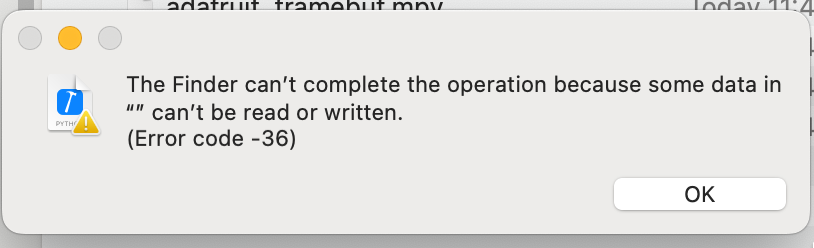
Additionally, when attempting to drag and drop files using Finder, the following error dialog appears:
The Finder can’t complete the operation because some data in “” can’t be read or written.
(Error code -36)
Solution
The issue can be resolved by remounting the volume in synchronous mode.
The following script can be used to remount the volume:
#!/usr/bin/env zsh

m=$(mount | grep /Volumes/CIRCUITPY | grep synchronous)

if [ ! "$m" ]; then
  devname=$(df | grep CIRCUITPY | cut -d" " -f1)
  sudo umount /Volumes/CIRCUITPY
  sudo mkdir /Volumes/CIRCUITPY
  sleep 2
  sudo mount -v -o sync -t msdos $devname /Volumes/CIRCUITPY
fi
Reference Information
Cause
In Sonoma, when copying files, a virtual file is first created, and a page-out to the file system is triggered. If mounted asynchronously, updates to the FAT and metadata are delayed until the data is flushed, resulting in a 0-byte file. This issue occurs under the conditions of filesystems smaller than 8MB, FAT16, UF2, and Python file writes.
https://github.com/adafruit/circuitpython/issues/8449#issuecomment-1745372269
My Solution
I created the following deployment script to address the issue.
remount.sh
#!/usr/bin/env zsh

ret=$(mount | grep /Volumes/CIRCUITPY | grep synchronous)

if [ ! "$ret" ]; then
  devname=$(df | grep CIRCUITPY | cut -d" " -f1)
  sudo umount /Volumes/CIRCUITPY
  sudo mkdir /Volumes/CIRCUITPY
  sleep 2
  sudo mount -v -o sync -t msdos $devname /Volumes/CIRCUITPY
fi
deploy.sh
#!/usr/bin/env zsh

cd $(dirname $0)

# Address the Input/output error issue when copying files on Sonoma and later
./remount.sh

files=(
  file_1.py
  file_2.py
)

for file in $files; do
  echo $file
  cp $file /Volumes/CIRCUITPY/
done

# Clean up junk files
dot_clean /Volumes/CIRCUITPY
ls -lhatr /Volumes/CIRCUITPY
We look forward to discussing your development needs.