Adding Dynamic Functionality to Submitted Raw HTML Templates with SSR in Next.js

This is a tutorial on how to handle the requirement of dynamically changing parts of the client-submitted HTML on the server side using Next.js.
The results of this project are published on Github:
https://github.com/ytyng/my-customer-submission
Deployed site: https://my-customer-submission.ytyng.com/
Setting Up the Next.js Environment
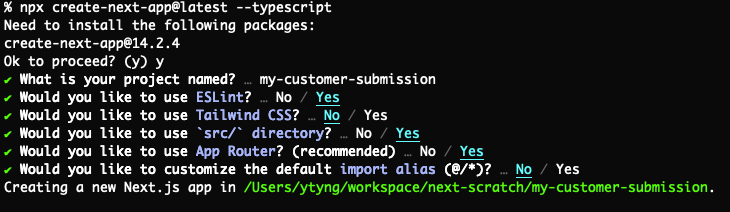
npx create-next-app@latest --typescript
Make the following selections:
- project name: my-customer-submission
- Would you like to use ESLint: Yes
- Would you like to use Tailwind CSS?: No
- Would you like to use
src/directory?: Yes - Would you like to use App Router? (recommended): Yes
- Would you like to customize the default import alias: Yes
Running the App
cd my-customer-submission
npm run dev
Adding the Submitted HTML
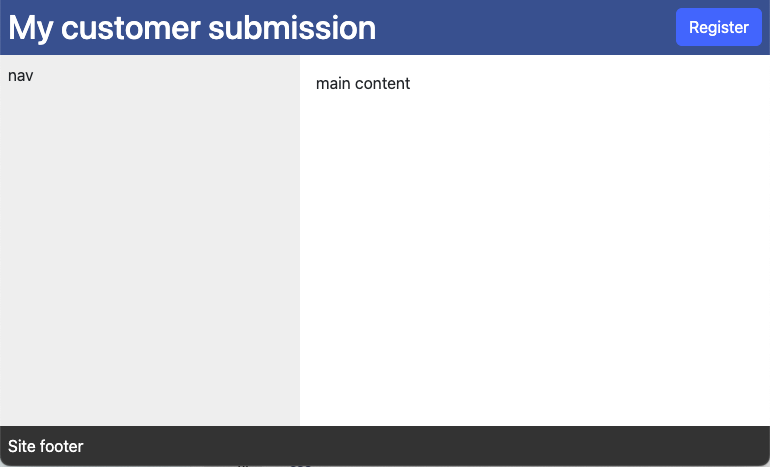
Create a src/templates folder and place the submitted HTML in it.
Assume that the CSS uses Bootstrap CDN and handwritten CSS.
src/templates/index.html
<html lang="ja">
<head>
  <meta charset="UTF-8">
  <title>My customer submission</title>
  <link href="https://cdn.jsdelivr.net/npm/bootstrap@5.3.0/dist/css/bootstrap.min.css"
        rel="stylesheet"
        integrity="sha384-9ndCyUaIbzAi2FUVXJi0CjmCapSmO7SnpJef0486qhLnuZ2cdeRhO02iuK6FUUVM"
        crossorigin="anonymous">
  <link rel="stylesheet" href="./css/site.css">
</head>

<body class="d-flex flex-column h-100">
<header class="site-header d-flex align-items-center">
  <h1 class="flex-grow-1 m-0 p-2">My customer submission</h1>
  <div>
    <button class="btn btn-primary m-2" id="register-button">Register</button>
  </div>
</header>
<div id="center-row" class="flex-grow-1 d-flex">
  <nav class="site-nav p-2">
    nav
  </nav>
  <main class="flex-grow-1">
    <div id="main-content" class="p-3">
      main content
    </div>
  </main>
</div>
<footer class="site-footer p-2">
  Site footer
</footer>
<script src="./js/site.js"></script>
</body>
</html>
src/templates/css/site.css
.site-header {
  background-color: #2b538f;
  color: white;
}

.site-nav {
  background-color: #eee;
  width: 300px;
}

.site-footer {
  background-color: #333;
  color: white;
}
src/templates/js/site.js
document.querySelector('#register-button').addEventListener('click', function() {
  alert('Hello World!');
})
Strategy
Extract only the contents of the body from the submitted HTML file and convert it into a React component. Then, replace the HTML element with id="main-content" with another React element.
Although the submitted HTML file contains head tags, we will not use them this time, and instead, create the head contents ourselves.
While there might be ways to parse and use the contents of the head, we will skip that for now and manually create the <link> tags, for example, to load Bootstrap from the CDN.
There is browser JavaScript. The action of pressing the "Register" button on the top right is registered. This will be copied as is into the public directory and returned to the client.
Preparing Libraries
Installing html-react-parser
To parse and use HTML, we will use html-react-parser.
npm install html-react-parser -D
Adding Components
Fetch posts from JSONPlaceholder and create a React component that displays them using Bootstrap's Card component.
src/app/interfaces/posts.ts
export interface PostData {
  userId: number
  id: number
  title: string
  body: string
}
src/app/components/PostCard.tsx
import {PostData} from '@/app/interfaces/posts'

/**
 * Component representing a single post card
 */
export default async function Component({postData}: {postData: PostData}) {
  return (
    <div className={'card my-3 mx-3'}>
      <div className={'card-header'}>
        #{postData.id} {postData.title}
      </div>
      <div className={'card-body p-2'}>
        <div>{postData.body}</div>
      </div>
    </div>
  )
}
src/app/components/PostCards.tsx
import {PostData} from '@/app/interfaces/posts'
import PostCard from './PostCard'

async function getPosts(): Promise<PostData[]> {
  const res = await fetch('https://jsonplaceholder.typicode.com/posts')
  return await res.json()
}

/**
 * Component that fetches and displays multiple post cards
 */
export default async function Component() {
  const posts = await getPosts()
  return posts.map((post: any) => (
    <PostCard postData={post} key={post.id}/>
  ));
}
Updating layout.tsx
In layout.tsx, return the html, head, and body HTML elements.
Import the template's CSS here.
This time, the link tags, etc., were hardcoded in the tsx instead of parsing them from the submitted HTML.
While it is not ideal to have duplicated management of the link tags and the class names in the body, what approach is best depends on the frequency of modifications to the submitted HTML and the project's policies.
src/app/layout.tsx
import type { Metadata } from "next";
import "../templates/css/site.css"

export const metadata: Metadata = {
  title: "My customer submission",
};


export default function RootLayout({
  children,
}: Readonly<{
  children: React.ReactNode;
}>) {
  return (
    <html lang="ja" className={'h-100'}>
      <head>
        <link href="https://cdn.jsdelivr.net/npm/bootstrap@5.3.0/dist/css/bootstrap.min.css"
              rel="stylesheet"
              integrity="sha384-9ndCyUaIbzAi2FUVXJi0CjmCapSmO7SnpJef0486qhLnuZ2cdeRhO02iuK6FUUVM"
              crossOrigin="anonymous"/>
      </head>
    <body className={'d-flex flex-column h-100'}>{children}</body>
    </html>
  );
}
Updating page.tsx
Load the submitted HTML, extract only the contents of the body using a regular expression, and parse it with html-react-parser.
Then, replace the <div id="main-content"></div> with the PostCards component.
src/app/page.tsx
'use server'

import fs from 'fs'
import parse from 'html-react-parser'
import PostCards from '@/app/components/PostCards'

/**
 * Get the contents of a file as text
 */
async function loadHtmlFile(filePath: string) {
  return fs.promises.readFile(filePath, 'utf8')
}

/**
 * Extract the contents of the HTML body tag
 */
function extractBodyContent(html: string) : string {
  const match = /<body[^>]*?>([\s\S]*)<\/body>/.exec(html)
  return match ? match[1] : html
}

/**
 * Replace the <div id="main-content"> within the template with PostCards
 */
function replaceElement(domNode: any, index: number) {
  if (domNode.type === "tag" && domNode.name === "div" && domNode.attribs.id === "main-content") {
    return (
      <PostCards />
    )
  }
}

/**
 * Get the Body of the template HTML as a JSX.Element
 */
async function getInnerBodyElement() {
  const htmlTemplatePath = "src/templates/index.html"
  const htmlTemplate = await loadHtmlFile(htmlTemplatePath)
  const innerBodyHTML = extractBodyContent(htmlTemplate)
  return parse(innerBodyHTML, {replace: replaceElement})
}

export default async function Home() {
  return await getInnerBodyElement()
}
Copying JS Files
Copy the submitted browser JavaScript into public/js/.
Running the App
It works.
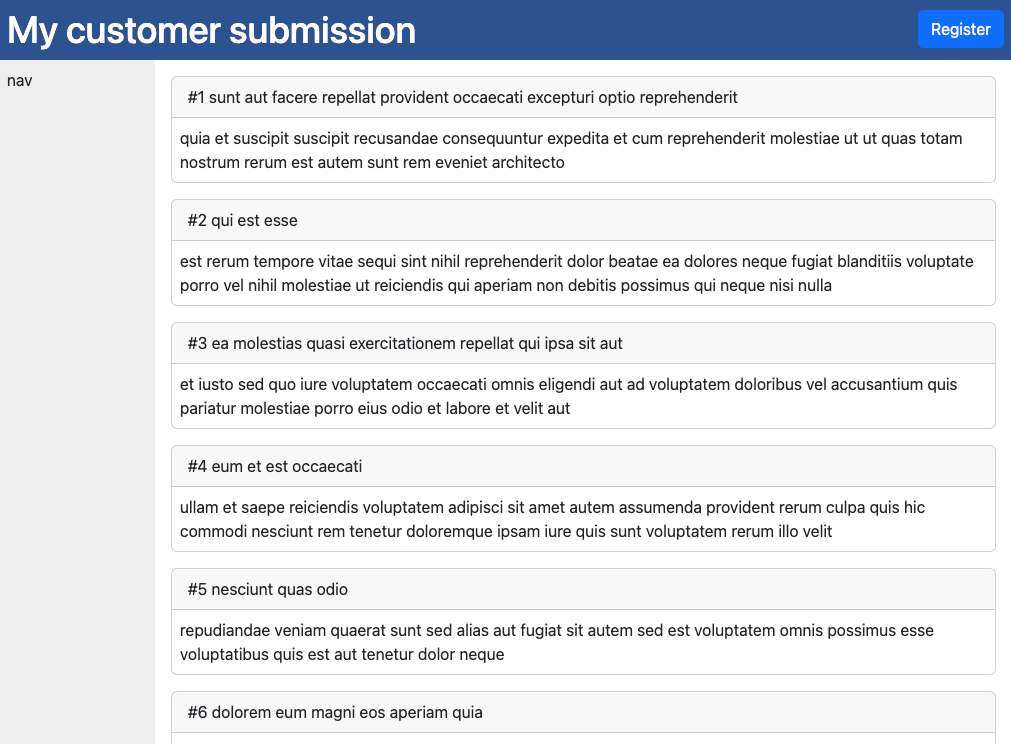
Deployed site: https://my-customer-submission.ytyng.com/
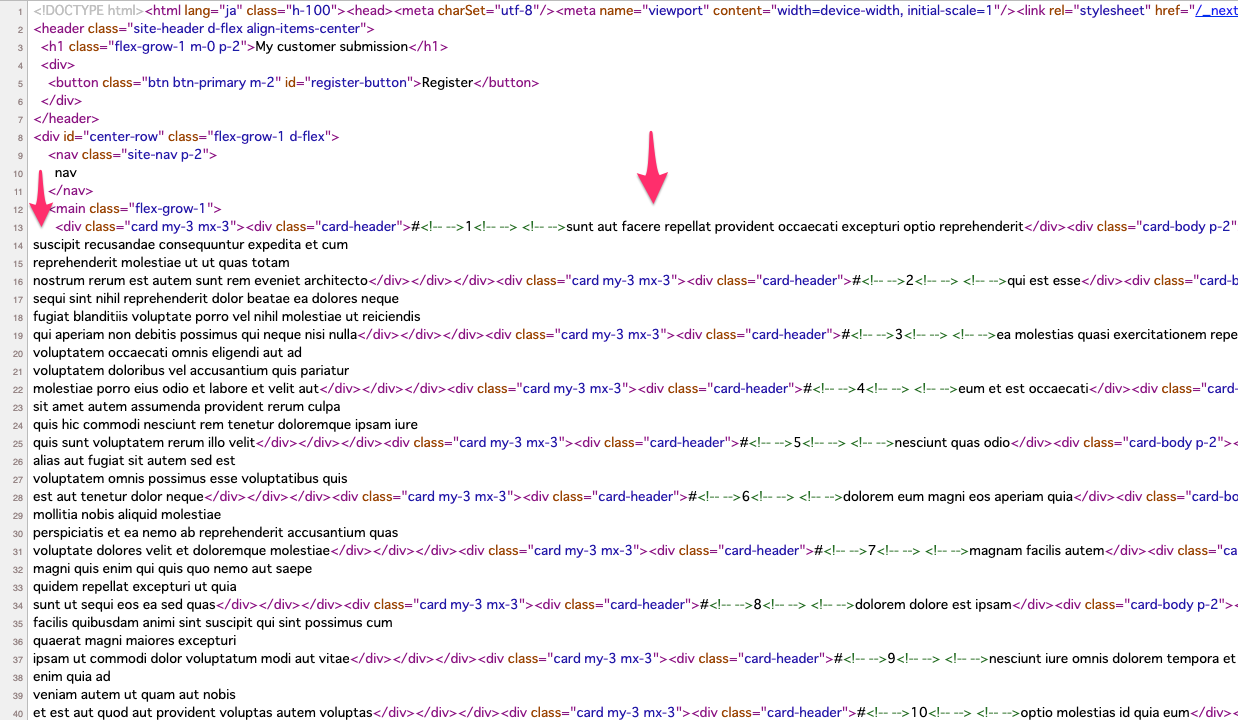
When viewing the generated HTML source, you can confirm that it is server-side rendered (SSR).
We look forward to discussing your development needs.