MySQL 8.0 で SSL モードを無効にして接続する (ERROR 2026 (HY000): SSL connection error: error 対応)
MySQL
2021-01-01 12:28 (5 years ago)

Mysql Client 8.0 から、MySQL 5.6 に接続しようとした所、
DataGrip では
[08S01]
Communications link failure

The last packet sent successfully to the server was 0 milliseconds ago. The driver has not received any packets from the server.
java.io.EOFException: SSL peer shut down incorrectly.
というメッセージが表示され、コマンドラインでは
% mysql --host=xxxxx  --user=xxxxx --password
Enter password:
ERROR 2026 (HY000): SSL connection error: error:1408F10B:SSL routines:ssl3_get_record:wrong version number
というエラーとなった。
これは、もともとサーバ側が SSL 無効でサービスしているにもかかわらず、クライアントからは SSL を有効にして接続を試みて、失敗している。
もしかしたら、クライアント側の SSL のバージョンと、サーバ側で対応している SSL の暗号化方式の不一致で発生しているかもしれない。
ちなみに、クライアント側 Mac の OpenSSL はこれ
% openssl version
LibreSSL 2.8.3
単純に、SSL を使わないで平文で良いなら、
mysql コマンドの場合は --ssl-mode=DISABLED をつける。
% mysql --host=xxxxx --user=xxxxx --password --ssl-mode=DISABLED
Enter password:
Welcome to the MySQL monitor. Commands end with ; or \g.
Your MySQL connection id is 1693381
Server version: 5.6.34-log MySQL Community Server (GPL)
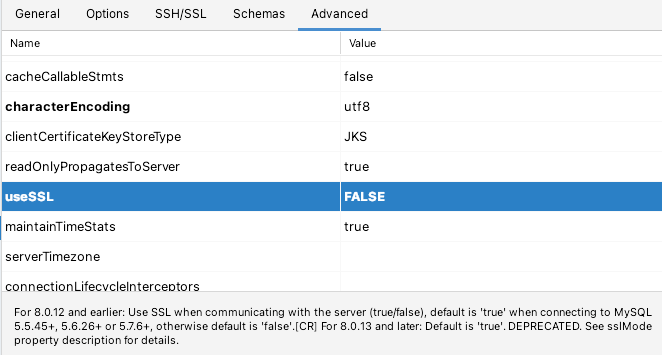
DataGrip の場合は、接続設定の Advanced タブの中に、useSSL という設定項目があるので、これを FALSE に変更する。
評価をお願いします (会員登録・ログイン不要)
現在の評価: 5.0 (1)
著者は、アプリケーション開発会社 Cyberneura を運営しています。
開発相談をお待ちしています。
開発相談をお待ちしています。