When Your MacBook Pro Intel Suddenly Slows Down (After Standby, etc.)

Cases where the MacBook Pro (Intel) suddenly slows down.
This often happened when recovering from standby mode.
The keyboard input becomes extremely sluggish, making it impractical to use.
Until now, I didn't know how to confirm this phenomenon, but it turns out that the CPU frequency of the Mac is being clocked down.
If you install an app called Intel Power Gadget, you can see the CPU frequency and understand what's happening.
Normally, the CPU operates at 2.3 GHz, but under certain conditions, it starts running at a maximum of 0.7 GHz. When this happens, everything becomes sluggish, making it impractical to use.
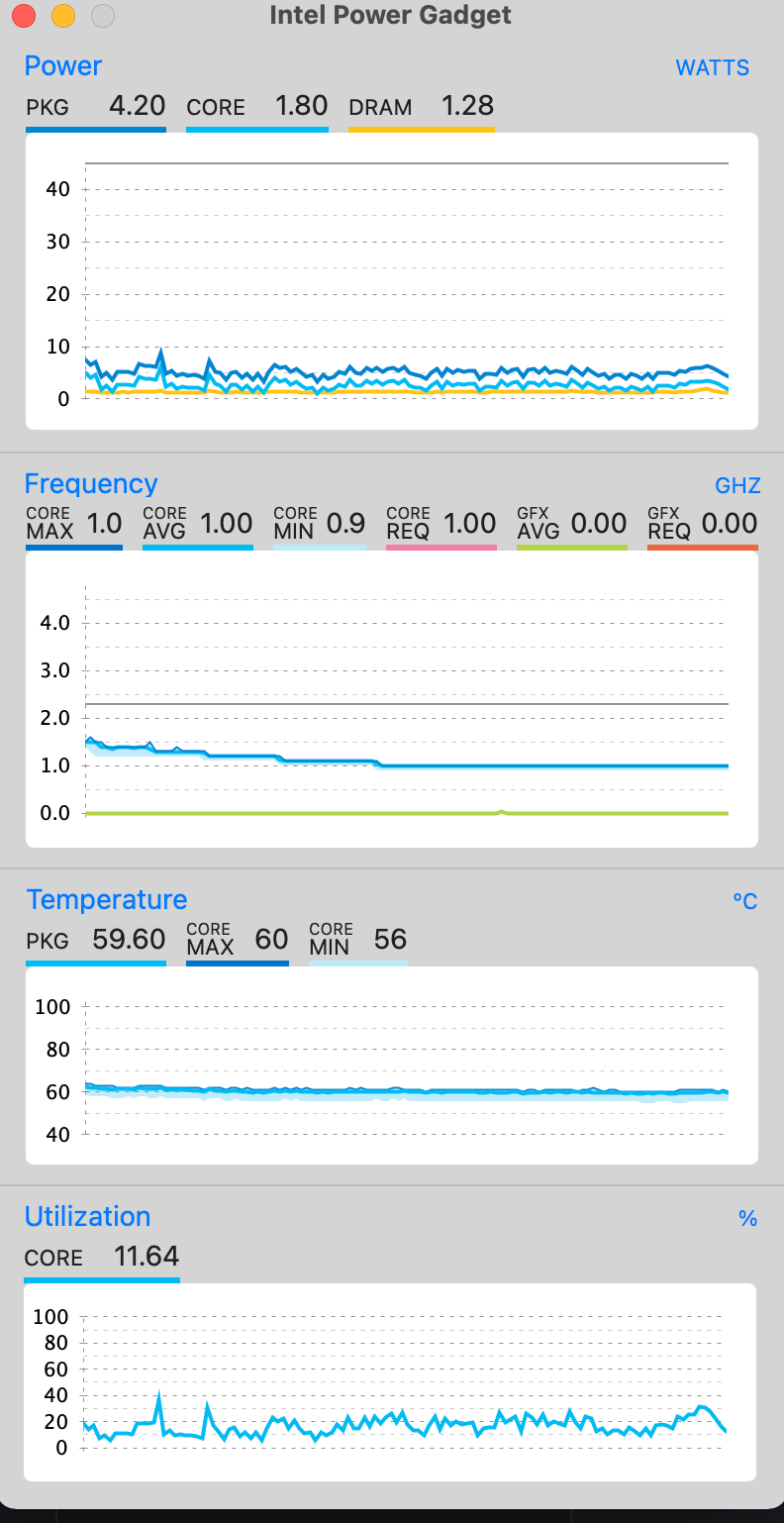
This phenomenon cannot be resolved by a simple reboot; it requires clearing the SMC.
To clear the SMC, you need to turn off the power, then hold down the left Shift + left Control + left Option and the power button for 7 seconds.
This phenomenon has been occurring since I bought the MacBook Pro, and I didn't know what was happening, but I finally understood that it was a CPU clock down issue.
However, the conditions for its occurrence and how to avoid it are still unknown. For now, the only solution is to reset the SMC when it happens, which is quite troublesome.
We look forward to discussing your development needs.