Building a Claude connector authenticated by your own OpenID Connect (OAuth2) provider
This post explains how to build a Claude custom connector (a remote MCP server) and have it authenticate against your own OpenID Connect provider.
What I build is a small MCP server that only returns the login name of the authenticated user. Claude.ai, Claude Desktop, mobile and Cowork all use the same connector platform, so if you register this one connector you can use it from any of them.
The stack used in this article is as follows.
| Role | What we use |
|---|---|
| MCP server | Python + FastMCP 3.x (Streamable HTTP / uvicorn) |
| OIDC provider (authorization server) | Django + Django OAuth Toolkit 3.x |
| Infrastructure | Kubernetes (exposed through ingress-nginx) |
However, the specifications Claude requires do not depend on the implementation or the environment. The protected resource metadata of RFC 9728, discovery directly under the issuer, PKCE and audience validation all apply as they are to another language, another OIDC provider or other infrastructure. Where something is specific to a library, I have written it so that you can tell.
What is a Claude custom connector
A custom connector is actually just an MCP server. There is no dedicated "connector" format or framework. You take an MCP server that is exposed to the internet over Streamable HTTP and register it by URL in Claude's settings screen. Something like a "Cowork-only connector" does not exist either.
The OAuth client functionality is already built into Claude. Adding authentication does not mean you have to write a login screen or a callback endpoint yourself.
Claude takes over the following for you.
- Discovery of the protected resource metadata and the authorization server metadata
- The client side of PKCE (generating the
code_verifier, deriving thecode_challenge, sending the verifier with the token request) - Running the authorization code flow (opening the browser, showing the authorization screen, exchanging the code for a token)
- Hosting the redirect URI (
https://claude.ai/api/mcp/auth_callback) - Storing and refreshing tokens
- Adding
Authorization: Bearerto later requests
Verifying PKCE is the authorization server's job. Claude only generates and sends the verifier and the challenge. Storing the challenge and checking it against the verifier is done on the authorization server side (RFC 7636 §4.6). It does not mean "Claude does it, so I don't have to do anything". Confirm that your authorization server advertises S256 in code_challenge_methods_supported and actually verifies it.
What you write yourself is only three things on the resource server side.
- Return 401 when unauthenticated, and use
WWW-Authenticateto tell the client "the entrance to authentication is here" - Serve the protected resource metadata (which authorization server to use, which scopes are needed)
- Verify the Bearer token you receive
You can give Claude a client_secret when registering the connector because Claude is a confidential client. In the classification of RFC 6749 §2.1, a client that can keep its credentials confidential is confidential, and one that cannot is public. Unlike an in-browser SPA or a native app, Claude stores the secret on the server side, so it is the former.
Terminology
| OAuth 2.0 / OIDC role | Who plays it here |
|---|---|
| Authorization Server / OpenID Provider | Your own OIDC provider |
| Client / Relying Party | Claude |
| Resource Server | The MCP server we are building |
| Resource Owner | The user of the connector |
By the way, some people call this "client" a Consumer, but OAuth 2.0 has no role with that name. "Client" is the correct term. Consumer / Service Provider are terms from OAuth 1.0 Core. They were already changed to client / server in RFC 5849, and OAuth 2.0 (RFC 6749) says client throughout. In an OIDC context, Relying Party (RP) is the more accurate name.
The overall flow
Claude ──(1) POST /mcp (no token)──────────────────> MCP server
       <──(2) 401 + WWW-Authenticate: Bearer resource_metadata="…" ──
       ──(3) GET /.well-known/oauth-protected-resource/mcp ────────>
       <──(4) { resource, authorization_servers, scopes_supported } ─
       ──(5) GET https://id.example.com/.well-known/openid-configuration ──> OIDC provider
       ──(6) Authorization code flow (PKCE S256) + user consent ───>
       ──(7) POST /mcp (Bearer token) ────────────────> MCP server
                                                       └─(8) POST /o/introspect/ ──> OIDC provider
Claude works in this order: when a 401 comes back, it reads the metadata URL written there, and uses the authorization server written in that metadata. If this chain of 401 → metadata → discovery is broken in even one place, you do not even reach the authorization screen.
What Claude requires
| Item | Requirement |
|---|---|
| Transport | Remote MCP (Streamable HTTP) |
| Unauthenticated response | 401 + WWW-Authenticate: Bearer resource_metadata="…". If you attach it to a 200, it is ignored |
| Resource metadata | RFC 9728. resource must exactly match the URL the user enters into Claude (including the path) |
| Authorization server metadata | RFC 8414 or OIDC Discovery, served directly under the issuer's /.well-known/ |
| PKCE | Required. code_challenge_method=S256 |
| Redirect URI | https://claude.ai/api/mcp/auth_callback |
| Client registration | DCR (Dynamic Client Registration, RFC 7591) / CIMD (Client ID Metadata Document) / for a custom connector, client_id + secret entered by hand |
| Authorization grant | Authorization code flow with user consent. client_credentials is not supported |
| Timeouts | 10 seconds for discovery / registration / token, 30 seconds for refresh |
| Source IP | 160.79.104.0/21 (Anthropic's outbound range) |
Sources: Building connectors — Authentication and IP addresses. The redirect URI, the timeouts and the IP range can change, so check the original documents when you implement.
Building the MCP server
The code examples below are excerpts. Imports and the loading of configuration values are left out, so they do not run as they are. I only show the main points so that the overall structure is clear.
In Python, FastMCP 3.x has most of the part that connects MCP and OAuth.
uv add "fastmcp==3.4.5" "uvicorn[standard]"
Pin the version. In FastMCP 3.x the authentication API changed from 2.x, and a lot of the information online is written for 2.x.
Assembling the auth provider
If you give RemoteAuthProvider "the thing that verifies tokens" and "the URL of the authorization server", it adds the RFC 9728 metadata endpoint and the 401 response for you.
Two notes first. Both are explained in detail later.
- Token verification uses introspection. It does not use UserInfo (the reason is in "Verify tokens with introspection")
- The client_id / client_secret passed here belong to a different Application from the one you enter into Claude (the reason is in "Use two sets of credentials")
from fastmcp import FastMCP
from fastmcp.server.auth import RemoteAuthProvider
from fastmcp.server.auth.providers.introspection import IntrospectionTokenVerifier

verifier = IntrospectionTokenVerifier(
    introspection_url="https://id.example.com/o/introspect/",
    client_id=RESOURCE_SERVER_CLIENT_ID,
    client_secret=RESOURCE_SERVER_CLIENT_SECRET,
    client_auth_method="client_secret_basic",
    required_scopes=["openid"],
    cache_ttl_seconds=60,
)

auth = RemoteAuthProvider(
    token_verifier=verifier,
    authorization_servers=["https://id.example.com"],
    base_url="https://mcp.example.com",    # no path here
    scopes_supported=["openid", "email"],  # scopes Claude will request
    resource_name="my-connector",
)

mcp = FastMCP("my-connector", auth=auth)
Do not put a path in base_url. It is joined with the path you pass to mcp.http_app(path=...) later, and the result becomes the resource.
Writing a tool
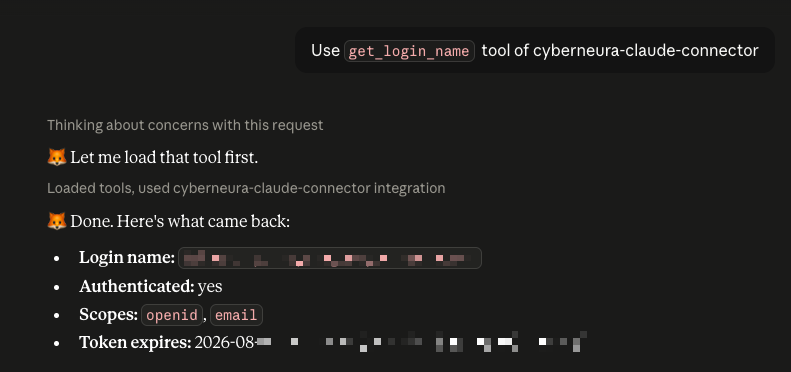
You can get the token of an authenticated request with get_access_token(). The introspection response is in claims as it is, so read the login name from there.
from fastmcp.server.dependencies import get_access_token

@mcp.tool
def get_login_name() -> dict:
    """Return the login name of the authenticated user."""
    token = get_access_token()
    claims = token.claims or {}
    return {
        "login_name": claims.get("username"),
        "scopes": list(token.scopes or []),
    }
Build the return value from an allowlist. You will want to write return claims, but if you do that, when fields are added on the authorization server side they flow into Claude's context as they are. Explicitly choose only the items that are fine to return.
Also prepare a path for health checks. It has to be placed in front of authentication, so make it a custom route, not a tool.
from starlette.requests import Request
from starlette.responses import PlainTextResponse

@mcp.custom_route("/healthz", methods=["GET"])
async def healthz(request: Request) -> PlainTextResponse:
    return PlainTextResponse("ok")
Turning it into an ASGI app
http_app() gives you a Starlette app. The path you pass here is the MCP endpoint, and it is joined with base_url to become the resource.
app = mcp.http_app(path="/mcp")
fix_authorization_server_issuer(app, ["https://id.example.com"])  # below
add_root_metadata_fallback(app, "/mcp")                           # below (in this order)
uvicorn --host 0.0.0.0 --port 8000 --workers 1 --no-proxy-headers main:app
There are reasons for --workers 1 and --no-proxy-headers ("Operational notes").
The metadata path
By RFC 9728 §3, if the resource is https://mcp.example.com/mcp, the metadata path is
/.well-known/oauth-protected-resource/mcp
The specification says that "the well-known URI string is inserted between the host component and the path component". It is not directly under the root.
However, some clients come looking directly under the root, so it is safer to serve the same content at the root as well. Reuse the same endpoint function so that the content of the two paths does not drift apart.
from starlette.routing import Route

WELL_KNOWN = "/.well-known/oauth-protected-resource"

def add_root_metadata_fallback(app, mcp_path: str) -> None:
    canonical = f"{WELL_KNOWN}{mcp_path}"
    for route in app.routes:
        if getattr(route, "path", None) == canonical:
            app.router.routes.append(
                Route(WELL_KNOWN, endpoint=route.endpoint, methods=["GET", "OPTIONS"])
            )
            return
    raise RuntimeError(f"metadata route not found: {canonical}")
Watch the trailing slash on authorization_servers
The MCP SDK normalizes URLs with pydantic's AnyHttpUrl, so a trailing slash is added to a URL that has no path.
{"authorization_servers": ["https://id.example.com/"]}
On the other hand, the issuer that an OIDC provider announces is often https://id.example.com (no slash). RFC 8414 §3.3 requires the issuer to match as a string, so a client that validates strictly rejects it here.
The reliable way is to rewrite the metadata response at the end so that the two match. Leave the generation of the metadata to the library, and fix it just before it is returned.
import json


class AuthorizationServerIssuerFix:
    """ASGI wrapper that aligns authorization_servers in the PRM with the issuer."""

    def __init__(self, app, issuers: list[str]):
        self.app = app
        # slash-appended form -> the real issuer
        self._fix = {f"{issuer}/": issuer for issuer in issuers}

    async def __call__(self, scope, receive, send):
        if scope["type"] != "http":
            await self.app(scope, receive, send)
            return

        start_message = None
        body = b""

        async def capture(message):
            nonlocal start_message, body
            if message["type"] == "http.response.start":
                start_message = message
                return
            if message["type"] == "http.response.body":
                body += message.get("body", b"")
                if message.get("more_body"):
                    return
                await self._send_fixed(send, start_message, body)
                return
            # pass unknown message types (extensions) straight through
            await send(message)

        await self.app(scope, receive, capture)

    async def _send_fixed(self, send, start_message, body):
        try:
            document = json.loads(body)
            servers = document.get("authorization_servers")
            if isinstance(servers, list):
                document["authorization_servers"] = [
                    self._fix.get(s, s) for s in servers
                ]
                body = json.dumps(document).encode()
        except ValueError:
            pass  # not JSON, leave it alone

        headers = [
            (k, v) for k, v in start_message["headers"]
            if k.lower() != b"content-length"
        ]
        headers.append((b"content-length", str(len(body)).encode()))
        await send({**start_message, "headers": headers})
        await send({"type": "http.response.body", "body": body})
Replace only the elements that match the issuer you configured. If you drop trailing slashes unconditionally, an issuer with a path (https://id.example.com/auth) is no longer in its canonical form. Also do not forget to set Content-Length again.
Put this over the metadata route. There is a trap here.
def fix_authorization_server_issuer(app, issuers: list[str]) -> None:
    for route in app.routes:
        path = getattr(route, "path", None)
        if not path or not path.startswith(WELL_KNOWN):
            continue
        route.endpoint = AuthorizationServerIssuerFix(route.endpoint, issuers)
        # This is required. Starlette builds the ASGI app from the endpoint when the Route is
        # created and keeps it in route.app, so replacing only the endpoint does not serve it.
        route.app = route.endpoint
Replacing only route.endpoint changes nothing. This is because Starlette builds an ASGI app from the endpoint at the time the Route is created and keeps it in route.app. The change takes effect only when you also assign to route.app.
The order of the calls is fixed too. Do it before adding the fallback. The fallback copies the endpoint of the canonical route by reference, so if you do it in the reverse order, the content of the two paths differs.
app = mcp.http_app(path="/mcp")
fix_authorization_server_issuer(app, ["https://id.example.com"])
add_root_metadata_fallback(app, "/mcp")
The OIDC provider side (Django OAuth Toolkit)
Serve the metadata directly under the issuer
DOT is normally mounted at /o/, so discovery only exists at /o/.well-known/openid-configuration. But if the issuer has no path (https://id.example.com), the metadata must be directly under the root of the host.
# urls.py
from oauth2_provider.views import ConnectDiscoveryInfoView, OAuthServerMetadataView

well_known = [
    path("openid-configuration", ConnectDiscoveryInfoView.as_view()),
    path("oauth-authorization-server", OAuthServerMetadataView.as_view()),
]

urlpatterns = [
    path("o/", include(oauth2_urls)),
    path(".well-known/", include(well_known)),
]
Register the paths without a trailing slash. Some clients fail when the 301 from APPEND_SLASH comes in between.
Note that when the issuer has a path, the rule for building the URL differs between the two specifications. RFC 8414 uses /.well-known/oauth-authorization-server/<issuer path>, and OIDC Discovery uses /<issuer path>/.well-known/openid-configuration. With an issuer that has no path the two are the same, so it is not a problem in the example in this article.
If you serve the frontend from a CDN or static hosting and only the API points to a different origin, you also need routing that sends /.well-known/* to the API side. If you forget this, the requests do not arrive even after you fix the Django side.
Registering the OAuth Application
Create it by hand from the Django Admin.
| Field | Value |
|---|---|
| Client type | Confidential |
| Authorization grant type | Authorization code |
| Redirect URIs | https://claude.ai/api/mcp/auth_callback |
| Algorithm | RSA with SHA-2 256 (RS256) |
| Skip authorization | Off |
Do not set Algorithm to No OIDC support. Claude comes with scopes that include openid, so oauthlib goes on to create an ID token.
# oauthlib/openid/connect/core/grant_types/base.py
def add_id_token(self, token, token_handler, request, nonce=None):
    # Treat it as normal OAuth 2 auth code request if openid is not present
    if not request.scopes or 'openid' not in request.scopes:
        return token
Right after this there is also a branch that looks at response_type, but a token request in the authorization code flow has no response_type, so it does not enter that branch and goes on to generate the ID token. As a result, with No OIDC support, Application.jwk_key is None and the token endpoint fails with a 500. It gets as far as the authorization screen and dies at the code exchange, so it fails in a way that makes the cause hard to find.
To use RS256 you need to set OAUTH2_PROVIDER['OIDC_RSA_PRIVATE_KEY'].
Note that if your design never requests openid (verifying by introspection with custom scopes only), No OIDC support is the right choice. The algorithm is decided by whether an ID token is issued or not.
You do not need to open dynamic client registration
DOT does have an implementation of DCR, but it is disabled by default, and the default permission class requires a registration access token. Claude's DCR is anonymous, so to support it you would have to make it possible for anyone on the internet to create an OAuth Application.
For a private connector for internal use, operating it as a custom connector with the client_id / client_secret entered by hand is enough.
Verify tokens with introspection
There are two ways for the MCP server (= the resource server) to verify the Bearer token it receives.
- Call the UserInfo endpoint (OpenID Connect Core 1.0 §5.3) and see whether it returns 200
- Verify it with Token Introspection (RFC 7662)
Both are standard specifications. UserInfo is part of OIDC Core, so most providers have it (although in the Discovery metadata it is RECOMMENDED, not required). Introspection is an extension specification of OAuth 2.0, so sometimes it is not implemented.
For both, the URL of the endpoint is not fixed by the specification. Look it up in the discovery document. The /o/... paths that appear in this article are an example for when Django OAuth Toolkit is mounted at /o/, and they differ for each implementation.
The two are listed in separate metadata documents. userinfo_endpoint is in OIDC Discovery, and introspection_endpoint is in the RFC 8414 metadata. With DOT, the OIDC document does not contain introspection_endpoint.
# UserInfo comes from OIDC Discovery
curl -sS https://id.example.com/.well-known/openid-configuration | jq .userinfo_endpoint

# Introspection comes from the RFC 8414 authorization server metadata
curl -sS https://id.example.com/.well-known/oauth-authorization-server | jq .introspection_endpoint
Choose introspection. There are two reasons.
1. UserInfo cannot be called with a resource-bound token
Following the MCP authorization specification, Claude adds the resource parameter of RFC 8707 to the authorization request.
GET /o/authorize/?...&resource=https%3A%2F%2Fmcp.example.com%2Fmcp
DOT 3.4 stores this in AccessToken.resource and validates the audience every time the token is used. And it is enabled by default.
# oauth2_provider/settings.py
"RESOURCE_SERVER_TOKEN_RESOURCE_VALIDATOR": (
    "oauth2_provider.oauth2_validators.validate_resource_as_url_prefix"
),
# oauth2_provider/oauth2_validators.py  validate_bearer_token
if access_token.resource:
    request_uri = (getattr(request, "uri", None) or "").split("?")[0]
    if not access_token.allows_audience(request_uri):
        ... ("error", "invalid_token") ... return False
If you call the authorization server's own endpoint (userinfo_endpoint) with a token bound to https://mcp.example.com/mcp, of course it does not match. A 401 with invalid_token is returned. This is the result of the authorization server working according to the specification.
With an authorization server that does not validate the audience, the same thing does work. But that is only "not being validated", and using a token issued for a resource server at an endpoint of the authorization server goes against the intent of RFC 8707. Even if it works now, it stops working when the provider implements the validation.
2. Introspection gives you audience, scope and expiry all at once
The introspection response gives you everything you need for verification.
{
  "active": true,
  "scope": "openid email",
  "exp": 1785000000,
  "client_id": "...",
  "username": "user@example.com",
  "aud": ["https://mcp.example.com/mcp"]
}
You do not need an introspection scope
DOT's IntrospectTokenView has required_scopes = ["introspection"], but it is not evaluated as long as you call it with HTTP Basic client authentication.
# oauth2_provider/views/mixins.py  ClientProtectedResourceMixin.dispatch
valid = self.authenticate_client(request)   # HTTP Basic is tried first
if not valid:
    valid, r = self.verify_request(request) # required_scopes only applies here
In addition, authenticate_client only looks at whether the client_id exists and whether the client_secret matches (it looks at neither the grant type nor the scope). You do not need to add a scope on the authorization server side.
RFC 7662 §2.1 also allows protection by client authentication, so it is valid under the specification too, but this behavior also depends on the evaluation order of DOT's dispatch. When you upgrade the version, actually call it and check.
Use two sets of credentials
Register two OAuth Applications.
| Application | Purpose | Grant type | Where the client_secret lives |
|---|---|---|---|
| For the client | Claude authorizes the user | Authorization code |
Only in Claude's connector settings |
| For the resource server | The MCP server calls introspection | Client credentials |
Only in the MCP server's environment variables |
It works if you use one for both, but there are three reasons to separate them.
- The roles are different. The former is an OAuth client, and the latter is the credentials the resource server uses to identify itself. If you share them, the MCP server's Pod ends up holding "credentials that can act as an OAuth client"
- Rotation is not tied together. If they are shared, every time you rotate the secret you have to update the settings on the Claude side and the settings on the server side at the same time, and if you update only one of them, one of the two stops working
- The number of copies of the secret does not increase. You can avoid a state where the same value is stored in two places
For the resource server one, practically any grant type goes through, but if you set it to Client credentials the role is clear when you read it. A redirect URI is not needed either.
Security notes
Always validate the audience
This is the most important point. Passing introspection only tells you that it is "a valid token issued by the authorization server". A token issued for a different application passes too. To meet the MCP authorization specification's requirement to "not accept tokens that are not addressed to you", you have to look at aud yourself.
FastMCP's IntrospectionTokenVerifier only looks at active / exp / required_scopes, so subclass it and add the check.
There are three rules for the decision.
- If
audis present, require that your own resource (base_url+ the MCP path) is included in it by exact match - If
audis absent, require thatclient_idmatches the Application for the client (described later) - If neither can be decided, reject
import logging

logger = logging.getLogger(__name__)


class ResourceBoundIntrospectionTokenVerifier(IntrospectionTokenVerifier):
    def __init__(self, *, resource: str, expected_client_id: str, **kwargs):
        super().__init__(**kwargs)
        self._resource = resource
        self._expected_client_id = expected_client_id

    async def verify_token(self, token):
        access_token = await super().verify_token(token)
        if access_token is None:
            return None
        error = self._binding_error(access_token.claims or {})
        if error is not None:
            logger.warning("rejected a token that is not for this resource: %s", error)
            return None
        return access_token

    def _binding_error(self, claims: dict) -> str | None:
        audiences = _parse_audiences(claims.get("aud"))
        if audiences is None:
            return "unparsable aud claim"
        if audiences:
            if self._resource in audiences:
                return None
            return f"audience mismatch: {audiences}"
        if claims.get("client_id") == self._expected_client_id:
            return None
        return "client_id mismatch and no audience to fall back on"


def _parse_audiences(value) -> list[str] | None:
    """Normalize aud into a list of strings. None if the type is unusable."""
    if value is None:
        return []
    if isinstance(value, str):
        return [value] if value.strip() else []
    if isinstance(value, list):
        return [str(item) for item in value if item]
    return None
Do not use a partial match. With a prefix match, /mcp and /mcp-admin get mixed up. Subdomains should also be treated as different things.
The second rule, the fallback, has limits. The client_id in introspection is the identifier of "the OAuth client that requested the token", and it is not the audience (RFC 7662 §2.2). Even if it matches, it is not proof that "this token was issued for me". This check only has meaning under the operational assumption that "this Application for the client is registered only for this MCP server". It is not equivalent to the audience validation of RFC 8707.
I still keep it because, if the client stops sending resource, I want to keep at least the guarantee that "tokens for other apps are rejected". As long as the resource is sent, the decision is made by rule 1.
When aud comes in a type that is neither a string nor an array, it is also rejected (the path where _parse_audiences returns None). If you treat a parse failure as "no restriction", then when something is wrong on the authorization server side, the token goes through without audience validation.
On the other hand, treat an empty aud ([]) as "no restriction". This is handling for compatibility that is specific to DOT. In DOT's internal representation an empty list means "not limited to a particular resource server", and the current implementation does not include aud itself in the response when it is empty. It is insurance to avoid all authentication failing when DOT starts including it in the future.
Note that under the JWT rule for aud (RFC 7519 §4.1.3), if aud exists you reject unless you are included in it. Letting an empty array through is a deviation from that rule, so if the provider you use gives the empty array a different meaning, follow the provider.
Authentication and authorization are different things
"Authentication passes" and "this user may use this server" are different. If your own OIDC provider also accepts registration by users outside the company, authentication alone is not enough.
There are two practical ways to narrow it down.
- The domain of the login name (email). Decide from the
usernameof introspection - Organization membership. If you have the concept of organizations, require that the user is a member
Before narrowing by domain, check what username means in that provider. The example in this article holds because USERNAME_FIELD is the email and ownership of the email address has been confirmed at registration. If you base authorization on a login name that the user can change freely, you allow impersonation.
If you write the domain check carelessly, things get through.
- Check the domain part by exact match. With a suffix match or a partial match,
attacker@evil-example.compasses. Treat subdomains (user@sub.example.com) as different things too - Reject strings that have two or more
@. If you cut at "after the last@", the latter half ofoutsider@other.com@example.comis interpreted as an allowed domain - Compare lowercase with lowercase (DNS domain names are not case-sensitive)
- Do not trim whitespace before comparing.
user@ example.comwould pass
Restricting it with a regular expression is safe.
import re

_EMAIL_PATTERN = re.compile(
    r"^[^@\s]+@((?:[a-z0-9](?:[a-z0-9-]*[a-z0-9])?\.)+[a-z]{2,})$",
    re.IGNORECASE,
)
When narrowing by organization membership, the standard introspection response contains no organization information. RFC 7662 allows adding your own members, so the simple way is to add it as an extension claim. With DOT, subclass IntrospectTokenView and register it before include(oauth2_urls).
# urls.py — must come before include(oauth2_urls); resolution is first-match
urlpatterns = [
    path("o/introspect/", CustomIntrospectTokenView.as_view(), name="introspect"),
    path("o/", include(oauth2_urls)),
]
import hashlib
import json

from django.http import JsonResponse
from oauth2_provider.models import get_access_token_model
from oauth2_provider.views import IntrospectTokenView as BaseIntrospectTokenView


class CustomIntrospectTokenView(BaseIntrospectTokenView):
    @staticmethod
    def get_token_response(token_value=None):
        response = BaseIntrospectTokenView.get_token_response(token_value)
        if response.status_code != 200:
            return response
        data = json.loads(response.content)
        if not data.get("active"):
            return response

        user_id = _get_token_user_id(token_value)
        if user_id is None:
            return response   # omit the claim; the resource server will reject

        data["organization_ids"] = [
            str(organization_id)
            for organization_id in Organization.objects.filter(
                organizationuser__user_id=user_id,
                organizationuser__status=ACCEPTED,
            ).values_list("id", flat=True)
        ]
        return JsonResponse(data)


def _get_token_user_id(token_value):
    # DOT indexes tokens by token_checksum (a SHA-256 hexdigest)
    checksum = hashlib.sha256(token_value.encode("utf-8")).hexdigest()
    return (
        get_access_token_model()
        .objects.filter(token_checksum=checksum)
        .values_list("user_id", flat=True)
        .first()
    )
get_token_response receives only the token string, so you have to look up the user again. DOT indexes tokens by token_checksum (a SHA-256 hexdigest), so look it up the same way. This is a place that needs to follow the library if the library changes how it builds the index, so it is safer to pin it down with a test.
Note that DOT by default also stores access tokens in plaintext. token_checksum is for indexing, and it does not mean the tokens are stored hashed. If you want to operate without keeping the plaintext, in line with RFC 9700, enable COMPLIANT_BCP_RFC9700_TOKEN_STORAGE (disabled by default).
Also pay attention to the membership status. Filter by status so that users who were only invited and have not accepted are not treated as members.
Do not rewrite the base logic entirely. If you receive the result and then add to it, you can follow along when the library adds response items (in fact aud was added in DOT 3.4).
When you cannot decide, reject
Keep this consistent as a design guideline.
| Situation | Behavior |
|---|---|
username is missing / not in email format |
Reject |
| The extension claim is missing (not yet deployed on the provider side) | Reject |
| The type of the claim is unexpected | Reject |
| A configuration value is invalid (not a UUID, etc.) | Fail at startup |
If you handle it as "cannot decide, so let it through", the restriction becomes disabled without you noticing. Validating configuration values at startup is for the same reason: you notice more easily when it does not start than when it keeps running with a wrong configuration.
Note that if your design lets you remove the restriction by emptying the allowlist, output a warning log at startup when it is empty, so that you notice when it has become empty unintentionally.
Let the name convey what the allowlist means
If you allow multiple values to be written in an allowlist, make it clear from the name whether the list is OR (any one) or AND (all of them). A name like REQUIRED_ORGANIZATION_IDS reads as "belongs to all of the listed ones", but if the implementation is intersection (any-of), the meaning is the opposite.
When someone adds a second value thinking "let's make the condition stricter", the allowed range gets wider, contrary to the intent. Starting the name with ALLOWED_ is the safe choice.
Rejections come back as 401, not 403
Know this as a constraint that exists by design. FastMCP has no path for rejection other than verify_token returning None. Even for an authorization failure (this user may not use it), a 401 is returned to the client.
Insufficient scope is the same. IntrospectionTokenVerifier checks required_scopes itself first and returns None, so the MCP SDK's 403 insufficient_scope path is not reached.
As a result, from the point of view of a user who is not allowed, it becomes repeated re-authentication. Log the reason for the rejection on the server side so that you can isolate the cause.
Cached results delay revocation
Introspection causes a round trip to the authorization server for each token, so you will want to cache the result. FastMCP's IntrospectionTokenVerifier also has cache_ttl_seconds (disabled by default).
While the result is cached, revocation of the token is not reflected. A user disconnecting the integration or an administrator revoking a token is reflected with a delay of up to the TTL. One of the advantages of introspection is "reflecting revocation in real time", so the longer you make the TTL, the more of that advantage you throw away.
For uses that need revocation to be reflected within seconds, set it to 0 (disabled). Otherwise it is safe to keep it to around a few tens of seconds.
Do not emit secrets or personal data
- Do not output the value of the access token in logs or in tool return values. In the access log, only
present/absent. For the query string too, only the key names. RFC 9700 §4.3.2, the current Best Current Practice, makes sending a token in the URI query a MUST NOT (at the time of RFC 6750 it was NOT RECOMMENDED), and the MCP authorization specification also prohibits it. Even so, to be prepared for implementations that send it by mistake, implement it so that the value is not left in logs - Build tool return values from an allowlist. If you return the whole introspection response, it leaks without you noticing when fields are added on the provider side. Explicitly choose the items that are fine to return, and for the rest return only a list of key names
- Do not write information that identifies an individual in rejection logs. The domain name is enough for isolating the cause
- Do not print the output of a command that may contain secret values to the terminal as it is. It stays in the terminal scrollback, terminal logs, screen sharing and the conversation logs of AI agents. When you want to check, narrow it down to the key names only
your-env-dump-command | sed -E 's/=.*/=<set>/'
Introspection responses are not gated by consent
The introspection endpoint can be called by any Application that has a valid client_id / client_secret pair. DOT's Basic authentication does not even look at the client type, and only verifies that the client_id exists and the secret matches. It does not look at all at the relationship between the caller and the token (the audience, or whether the caller is the party the token was issued to).
And DOT's standard introspection returns username (= the user's email) regardless of whether the email scope is present.
if token.user:
    data["username"] = token.user.get_username()
In other words, the scope consent gate that exists on the UserInfo side does not work for introspection. When you add an extension claim, decide on the assumption that it "can be read by every confidential app that has the token string".
If you have opened self-service app registration (DCR), or you issue client credentials to third parties, you need to restrict the resource server client_ids with an allowlist, or gate it with a scope.
Restrict the source IP
Connections from Claude come from Anthropic's outbound range. With ingress-nginx, write it as follows.
nginx.ingress.kubernetes.io/whitelist-source-range: "160.79.104.0/21"
Do not confuse it with the inbound 160.79.104.0/23. They are different. Use the Outbound IPv4 in the official documentation.
As a prerequisite, the real client IP has to be visible from the ingress. If you have a cloud load balancer in front, then without externalTrafficPolicy: Local or a proxy protocol setting, the ingress only sees the IP after the LB's SNAT. If you add the allowlist in that state, either everything is blocked, or the LB's IP passes and the restriction is effectively disabled.
Before adding it, be sure to make a connection succeed once and check the actual source in the access log. If you do it in the reverse order, you cannot tell whether the cause of a failed connection is the IP restriction or OAuth.
After it is enabled, curl from your own machine also gets a 403. Also, requests dropped at the ingress are not recorded in the app's access log at all. When it stops connecting, look at the ingress log first.
Operational notes
Keep it to one process
With FastMCP's default (stateful), the Streamable HTTP session is kept inside the process. With multiple workers / multiple replicas, the process that issued the mcp-session-id and the process that receives the next request are different, and the session cannot be found.
(FastMCP also has stateless_http=True, and in that case a transport is created for each request, so this constraint goes away. What follows is about the stateful setup in this article.)
uvicorn --workers 1 --no-proxy-headers main:app
On Kubernetes, set strategy: Recreate in addition to replicas: 1. With RollingUpdate, the old and the new Pod, two in total, are both behind the Service only during the update, and the same problem occurs.
--no-proxy-headers is for a different reason. uvicorn's proxy_headers is enabled by default, and request.client is overwritten with the value of X-Forwarded-For. In the access log you can no longer distinguish "the peer IP that came from the ingress" from "the IP the client claimed", so turn it off if you want to verify the source.
Do not let SSE be buffered
The default settings of a reverse proxy buffer the response in many cases. text/event-stream stops flowing, so turn it off. There are periods with no traffic, so also extend the read timeout.
nginx.ingress.kubernetes.io/proxy-buffering: "off"
nginx.ingress.kubernetes.io/proxy-read-timeout: "3600"
nginx.ingress.kubernetes.io/proxy-send-timeout: "3600"
Checking the connection
After deploying, call it yourself and check before registering it in Claude.
# Does it return 401 with WWW-Authenticate?
curl -sS -D - -o /dev/null -X POST https://mcp.example.com/mcp \
  -H 'Content-Type: application/json' \
  -H 'Accept: application/json, text/event-stream' \
  -d '{"jsonrpc":"2.0","id":1,"method":"initialize","params":{}}'

# protected resource metadata
curl -sS https://mcp.example.com/.well-known/oauth-protected-resource/mcp

# Is the authorization server metadata under the issuer?
curl -sS https://id.example.com/.well-known/openid-configuration
The metadata should look like this. Check by eye that the MCP path is still in resource and that authorization_servers matches the issuer as a string.
{
  "resource": "https://mcp.example.com/mcp",
  "authorization_servers": ["https://id.example.com"],
  "scopes_supported": ["openid", "email"],
  "bearer_methods_supported": ["header"]
}
Check the client authentication of introspection in advance too. If {"active": false} comes back for a token that does not exist, the authentication itself is passing (if the credentials are wrong, it is a 403).
curl -sS -u "$RS_CLIENT_ID:$RS_CLIENT_SECRET" \
  -X POST https://id.example.com/o/introspect/ -d 'token=dummy'
After that, in Claude's Settings → Connectors → Add custom connector, enter https://mcp.example.com/mcp as the URL, and enter the client_id / client_secret of the Application for the client in the advanced settings.
Make the URL exactly match the resource in the metadata. What the specification requires is a match, not "no trailing slash", but the URL the user enters, the MCP endpoint and the resource in the metadata all three have to be the same, so unifying on no trailing slash makes mistakes less likely.
Related posts
 Sorting OIDC / OAuth 2.0 Terms into Three Axes — Authorization Code / Implicit / Confidential / Public / PKCE
 Choosing an OIDC id_token Signing Algorithm — RS256 / ES256 / HS256, and the One Line That Matters More
 After Updating Django, Migration Fails for oauth2_provider
 Skill + CLI over MCP: Replacing Sentry MCP with a multi-profile CLI wrapper
We look forward to discussing your development needs.