QueryFolio — a SQL client desktop app
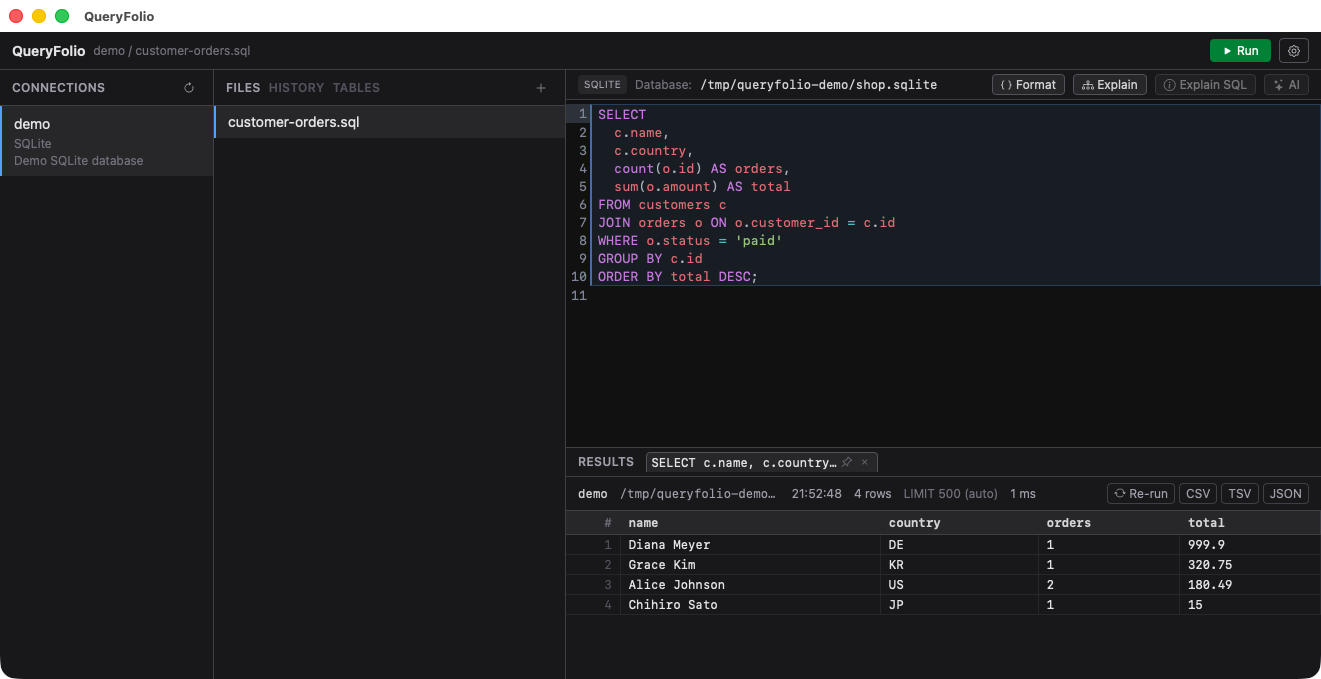
QueryFolio is a SQL client desktop app I built so that several database engines can be handled from a single app. Alongside the SQL engines — MySQL, PostgreSQL, SQLite and DuckDB — it also connects to Redis, Elasticsearch and DynamoDB from the same window.
- Download the latest version (macOS / Windows): https://github.com/cyberneura/queryfolio/releases/latest
Demo video
Why I built it
The starting point was wanting to handle several database engines from a single app. Not just relational databases: engines queried in a completely different way — Redis, Elasticsearch, DynamoDB — are reachable from the same window with the same workflow. The design goals are four: light, multi-engine, safe with credentials, and helpful with AI.
Key features
- Multiple engines — MySQL, PostgreSQL, SQLite and DuckDB on the SQL side, plus Redis, Elasticsearch and DynamoDB, all from a single app. The editor language and the unit of execution switch per engine (one command per line for Redis, Kibana-Console-style request blocks for Elasticsearch, PartiQL for DynamoDB, and a local-file SQL engine for DuckDB). Each engine declares what it supports, so unsupported features are hidden from the UI instead of sitting there as dead buttons.
- Connection config in YAML — compatible with the sql-agent-mcp-server format. Secrets can stay in 1Password and be fetched lazily through a getter command like
op read "op://...", so passwords never have to be written into the config file. - SSH tunnel — local port forwarding with known_hosts verification, for databases behind a bastion host. Naming a Host from
~/.ssh/configalso enables multi-hop tunnels via ProxyJump. - Schema-based autocompletion — table and column names. The schema browser (TABLES pane) lazy-loads columns; it shows indices and mapping fields for Elasticsearch, and tables with their key attributes for DynamoDB.
- Safety guards — set
readonly: trueper connection to reject write statements (INSERT / UPDATE / DELETE / DDL, including CTE-wrapped DML). SELECTs without a LIMIT get one appended automatically (default 500). The same guard works as a whitelist of read commands on Redis and of read APIs on Elasticsearch. - psql-style meta commands —
\l\dt\dv\dn\du\d [table]translated into per-engine catalog queries (with MySQL / SQLite equivalents where possible). - Query history — stored locally per connection. Because SQL can contain sensitive data, the files are written with restrictive permissions.
- Working with results — tabs, pinning, a cell inspector, and CSV / TSV / JSON copy (formula-injection safe). Running queries can be cancelled.
- AI features (OpenAI) — SQL generation from natural language, Fix with AI on errors, EXPLAIN plan analysis with index suggestions, and explanation of selected SQL. Generated SQL is only inserted into the editor, never auto-executed. Only the schema (table / column names), engine dialect, statements, and plans are sent — query results are never sent.
Security decisions
A SQL client handles sensitive information, so I set a few rules. The API key is never handed to the frontend (WebView); it stays inside the Rust backend only. What goes to the AI is schema structure and query text — never the actual data (query results). Connection passwords can be referenced from 1Password so they never sit in plaintext in a config file.
Download
-
Download the latest version: https://github.com/cyberneura/queryfolio/releases