When Notifications Don't Appear Only When Connecting an External Display with DisplayLink on an M1 Mac
mac
2021-12-11 12:11 (4 years ago)

If you are using an M1 Mac and want to use multiple external displays by outputting the screen through a Display Link adapter, there might be instances where Mac notifications do not appear.
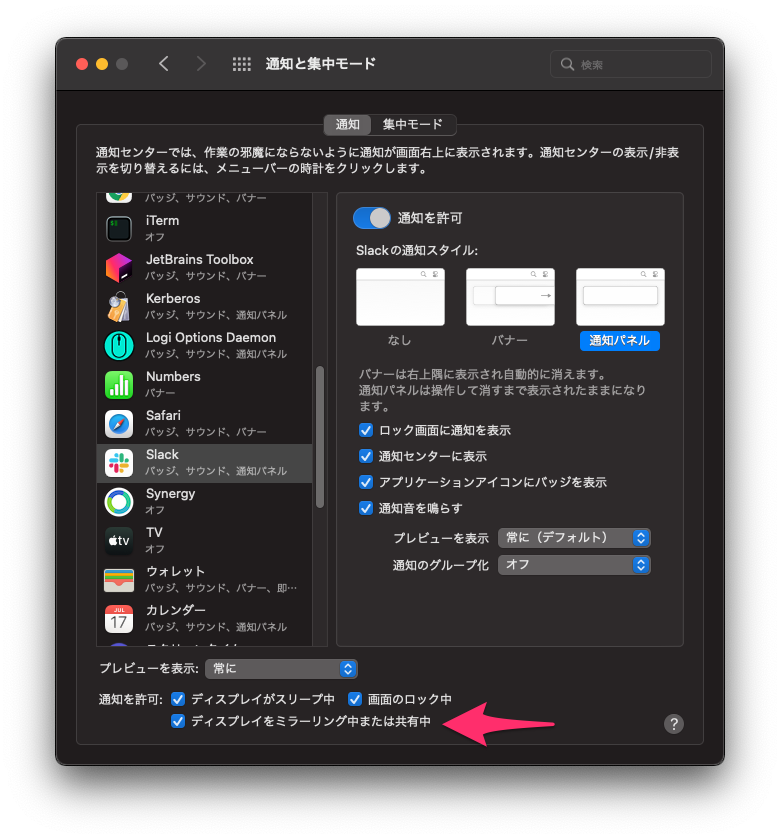
In the "Notifications" settings, if the checkbox for "Allow notifications: When mirroring or sharing the display" is unchecked, notifications will not appear while using Display Link. Please make sure to turn this checkbox ON.
Please rate this article (No signup or login required)
Current rating: 4.2 (5)
The author runs the application development company Cyberneura.
We look forward to discussing your development needs.
We look forward to discussing your development needs.